
START WITH YOUR BUSINESS NEED

Customer support: every request followed, with all its context

A request comes in. Who takes it, what do we know about the customer, where does it stand? In Neoo, every request becomes a ticket linked to its customer, with its tasks, conversations and history. Whoever answers sees the whole record.

Neoo Start and Neoo Business: 30-day free trial. Not ready yet? Watch the videos or book a demo.

Neoo Business: from €158 per month excl. VAT, hosting included, 30-day free trial. Neoo MSP: billed per technician, detailed on the pricing page.

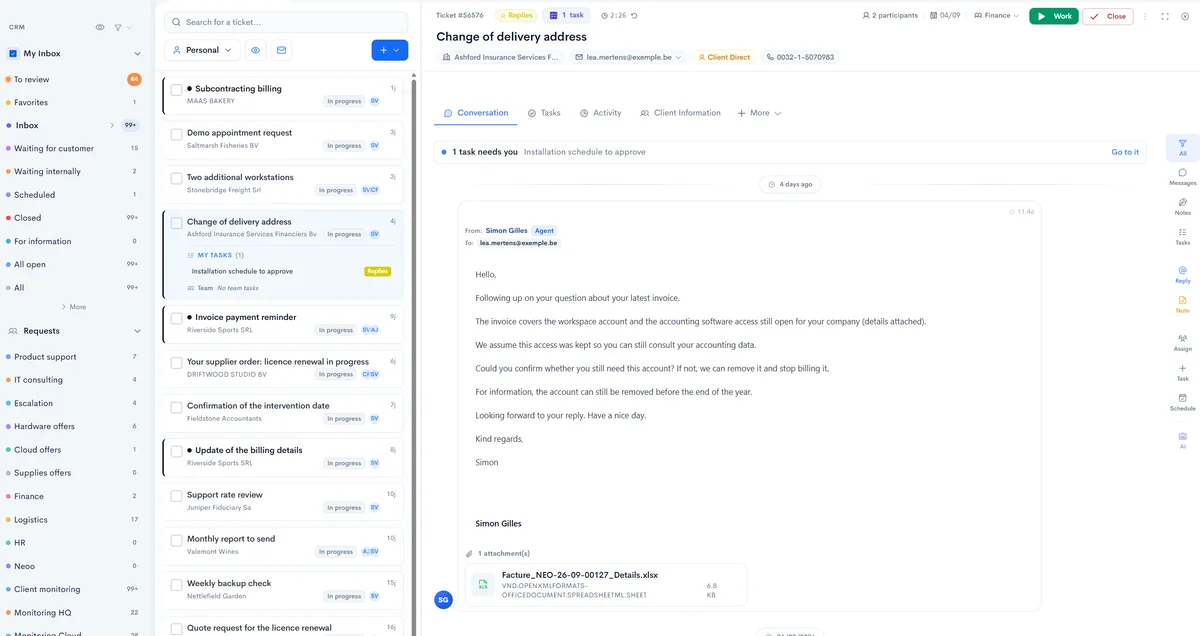
Neoo inbox: personal views and team queues, the ticket list with its tasks, and an open ticket with its customer, contact and conversation.
Real Neoo screen · customer data anonymised

IN NEOO

From request to closure, screen by screen.

Seven real Neoo screens, from team queues to the morning dashboard. Names, amounts and contact details are fictitious; the rest is the application as it works.

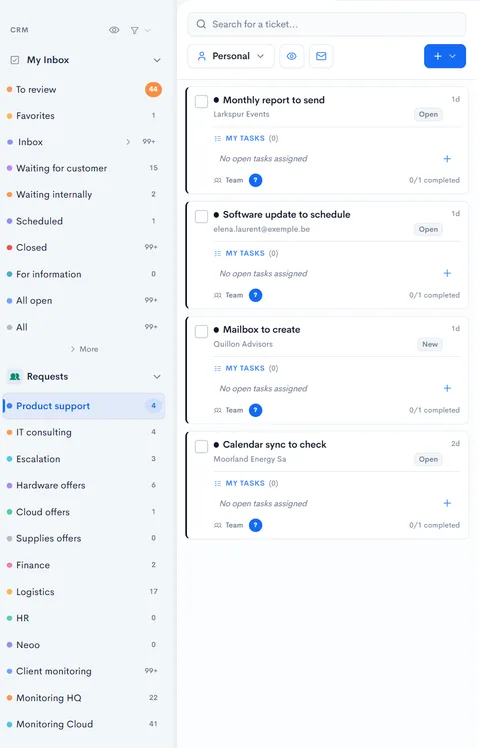
Inbox in Neoo: personal views, team queues with their number of requests and ticket cards with their customer, status and tasks.
Real Neoo screen · customer data anonymised

QUEUES

Every team has its own request queue.

Your personal views (to review, waiting for customer, waiting internally, scheduled) and your teams’ queues: product support, escalation, finance, logistics… Every card shows the customer, the status and your tasks.

  • Personal views and queues per team
  • The number of requests in each queue
  • Customer, status and your tasks on every card
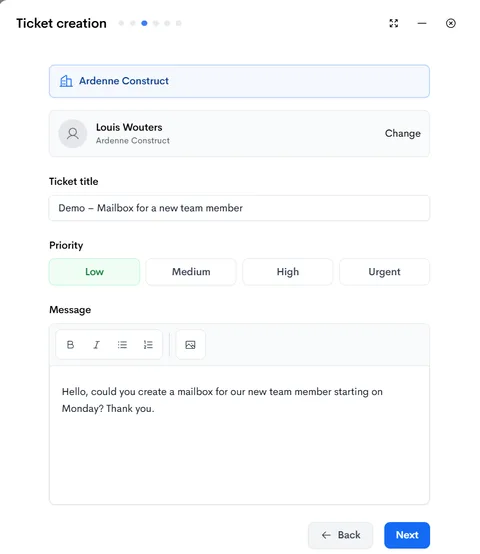
Ticket creation in Neoo: customer, contact, title, priority and request message.
Real Neoo screen · customer data anonymised

A NEW REQUEST

A ticket created in a few steps.

Choose the customer and contact, then add a title, a priority and the message. The wizard then lets you assign the request to an agent or leave it unassigned.

  • Customer and contact chosen first
  • Low, medium, high or urgent priority
  • An assigned agent, or no assignment
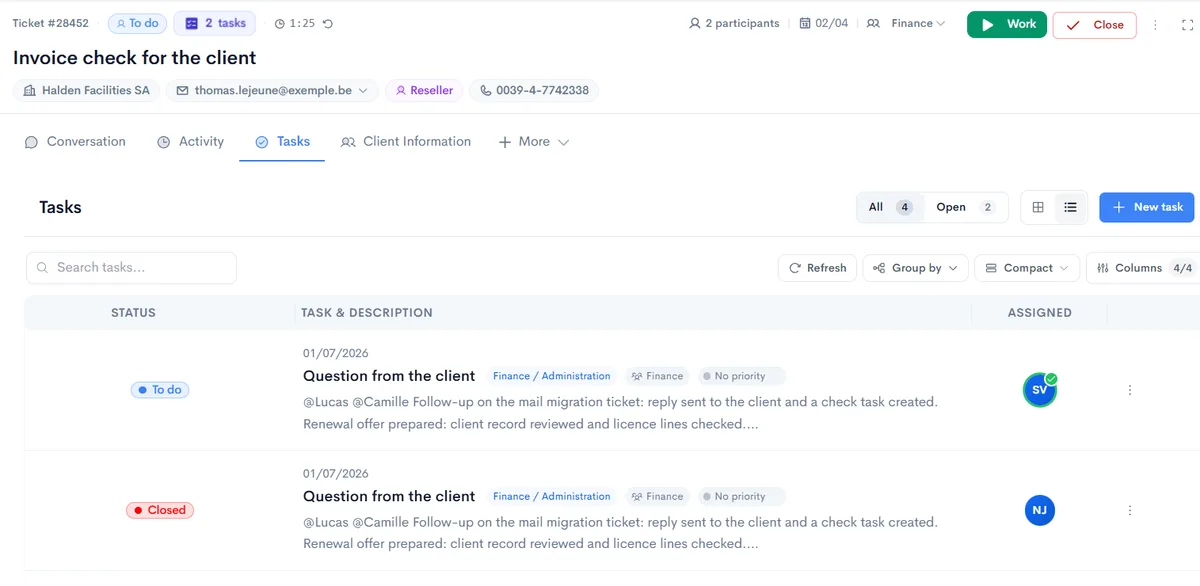
Tasks tab of a ticket in Neoo: customer, contact and team at the top, then tasks with their status, team, priority and assignee.
Real Neoo screen · customer data anonymised

TASKS

Work is split into tasks.

Inside the ticket, every task has its status, team, priority and assignee. At the top of the ticket: the customer, contact, team in charge, participants and number of tasks.

  • One task per action, with its team and priority
  • The assignee on every line
  • Search, grouping and columns of your choice
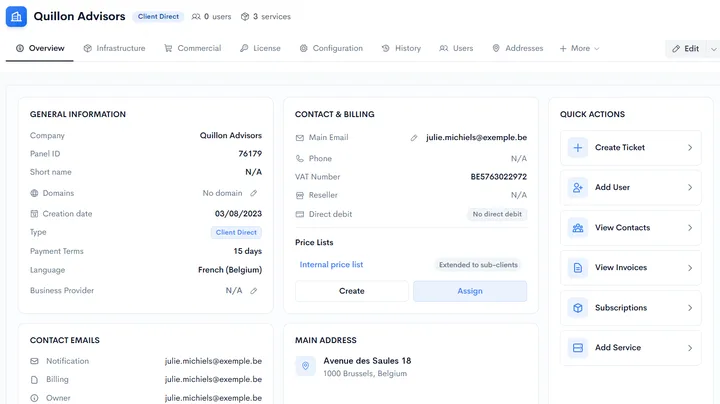
Client Information tab of a ticket in Neoo: general information, contact and billing, price lists and quick actions.
Real Neoo screen · customer data anonymised

THE CUSTOMER

The customer record, without leaving the request.

The Client Information tab shows the record inside the ticket: contact details, payment terms, price list, address and contact emails. Quick actions create a ticket, add a user or add a service.

  • The customer’s contact details and terms
  • The customer’s contact emails, by role
  • Quick actions: ticket, user, contacts, invoices, service
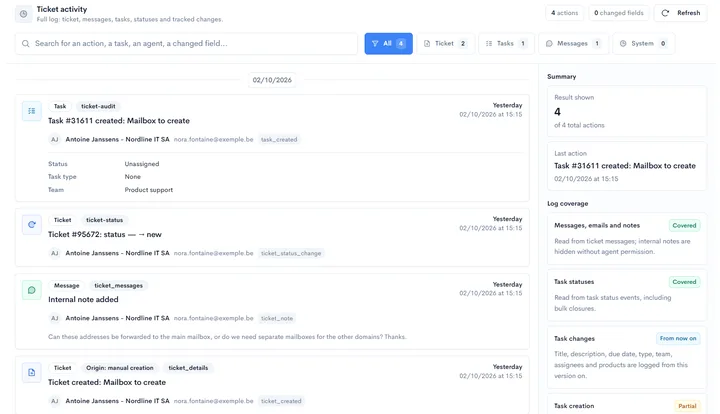
Activity log of a ticket in Neoo: ticket creation, status change, task created and internal note, with their authors and times.
Real Neoo screen · customer data anonymised

HISTORY

Everything that happened, dated.

The activity log brings together the ticket, messages, tasks and status changes, with their author and time. Filter by type or search for an action.

  • Creation, statuses, tasks and notes in one thread
  • Every action with its author and time
  • Filters by type: ticket, tasks, messages, system
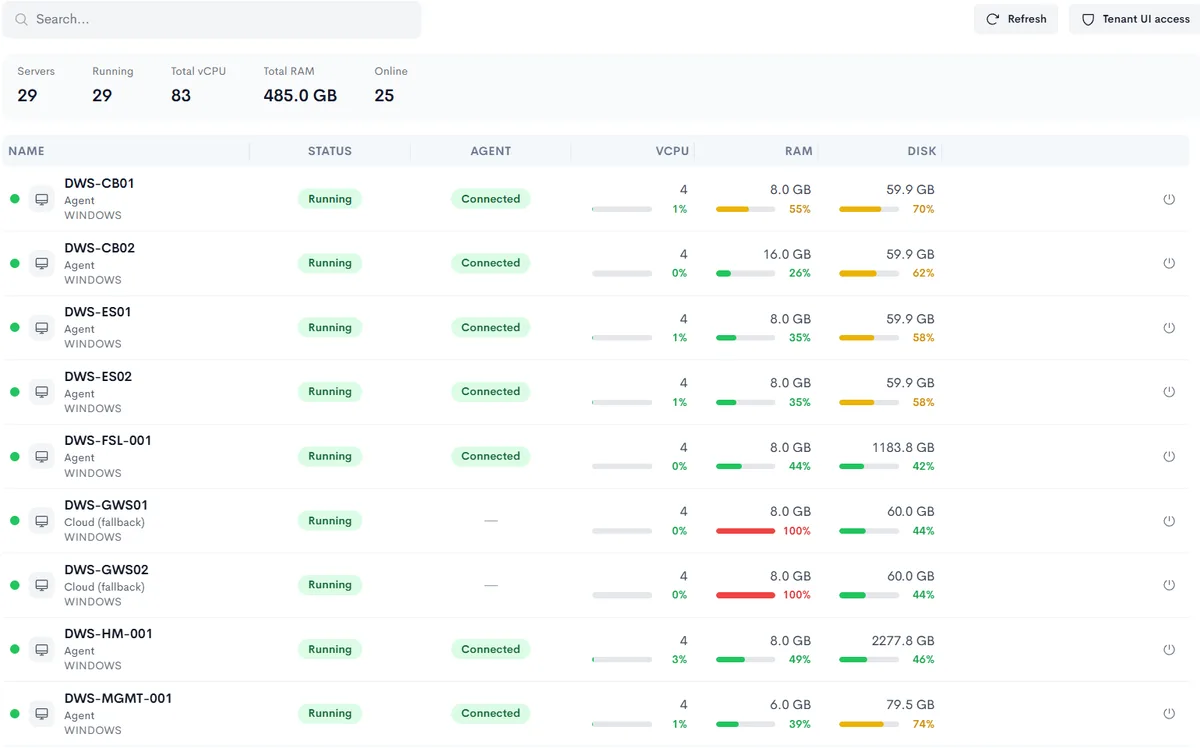
A customer’s infrastructure in Neoo: number of servers, running servers, processors, memory, then the server list with their state, agent, memory and disk.
Real Neoo screen · customer data anonymised

FOR AN IT PROVIDER

The customer’s environment, at hand.

For an IT provider, the customer record also shows its infrastructure: servers, state, agent, processors, memory and disk. The technician knows what they are working on before opening a session.

  • Servers online and running
  • Processors, memory and disk for each server
  • The agent state on every machine
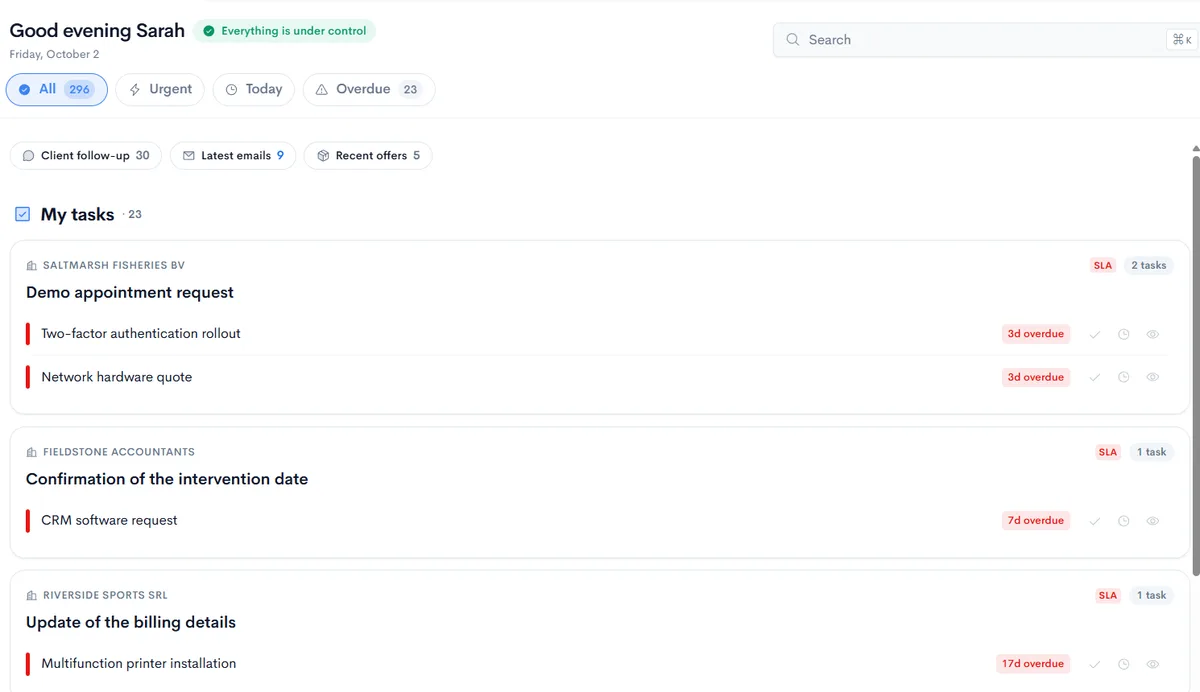
Dashboard in Neoo: tasks grouped by customer and request, with their days overdue, and Urgent, Today and Overdue filters.
Real Neoo screen · customer data anonymised

EVERY MORNING

What is urgent comes first.

The dashboard gathers your tasks by customer and by request, with their days overdue. The Urgent, Today and Overdue filters sort the day.

  • Your tasks grouped by customer and request
  • Days overdue flagged in red
  • Urgent, Today and Overdue filters

From request to closure

Example workflow, to adapt to your team.

  1. Request

    A customer email or a request created by hand becomes a ticket linked to its customer.

  2. Team queue

    The ticket joins the queue of the team concerned, then an agent takes it on.

  3. Tasks

    Work is split into tasks, each with its team and assignee.

  4. Conversation

    The conversation, notes and attachments stay in the ticket, next to the customer record.

  5. Closure and billing

    The ticket is closed; time spent, linked to the ticket, appears in pending billing when it is billable.

Choose your plan

Plans that answer this need

Neoo Business

€59 per user per month, plus your company’s hosting: from €158 per month. Neoo Scheduling included, Peppol built in. Options and onboarding are extra. 30-day free trial.

Explore the plan

Neoo MSP

Billed per technician, with several monthly or annual tiers. All amounts are detailed on the pricing page.

Explore the plan

Prices exclude VAT.

Not sure which plan fits? Show us your process in a demo and we will point you to the right one.

Options and connections

Business is for companies that share a process across teams. MSP is built for IT providers: per-technician pricing and management of all your clients. They are two trades, not two tiers.

Neoo Commander and Desktop & Apps are options for Business and MSP. Accounting Apps requires Business and Desktop & Apps. Forge is free up to 10 credits a month, renewed every month, with no subscription: what you build is priced by its hosting.

Already using other tools? Tell us which information must move, in which direction and how often: we look with you at the connection that fits.

Before you choose

Business or MSP?

Business if you answer your own customers as part of your activity. MSP if you manage IT for several clients: environments, resources, contracts and interventions.

How does a request become a ticket?

A customer email can become a ticket, and you can also create a ticket by hand, from the inbox or from the customer record. The ticket is linked to the customer from the start.

Is time spent on a ticket invoiced?

Working time is recorded as sessions linked to the ticket and the task. Billable time appears in pending billing with its customer; it can also be covered by the customer’s contract.

Which MSP tier should I choose?

Start from the functions you need and the number of technicians. The pricing comparison details each tier, monthly or annual.

Launch your first workflow today.

Try it now

Neoo Start and Neoo Business: 30-day free trial. Not ready yet? Watch the videos or book a demo.